In this article
Ask someone which version of Android their phone runs and they can usually find out. Ask when it last got a security patch and you'll often get a blank look. That second date matters more. A phone can run a recent version of Android and still be months behind on fixes for known security holes.
Here's where to find the date, how to read it, and what to do if the answer isn't good.
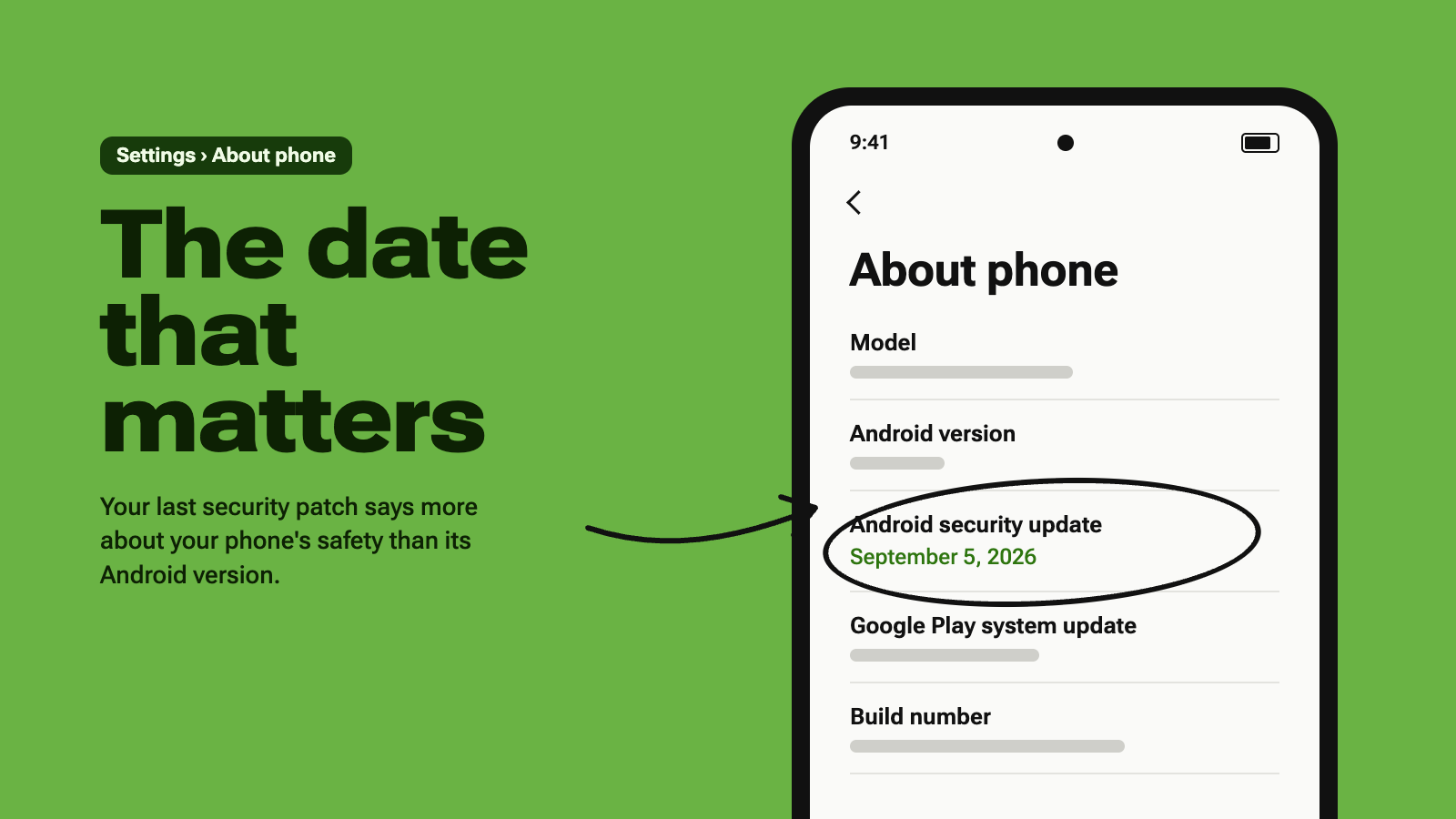
Find your security patch date
The wording varies a little between brands, but the setting is nearly always in the same place.
- Open Settings.
- Scroll to the bottom and tap About phone. On a Samsung phone, tap Software information next.
- Look for Android security update or Security patch level. The date next to it is your answer.
Can't see it? Tap the search bar at the top of Settings and type "security patch". On most phones that takes you straight to the right screen.
On a Google Pixel there's a shortcut. Settings > Security & privacy > System & updates shows the patch date and lets you check for a newer one on the same screen.
What the date means
Every month Google publishes a list of Android security fixes, called the Android Security Bulletin. Phone makers then add those fixes to their own software and send them out on their own schedules, which is why your patch date usually trails the calendar a little.
As a rough guide:
| Your patch date is | What it usually means |
|---|---|
| Within the last two months | You're up to date. Nothing to do. |
| Three to six months old | An update may be waiting. Some phones only get patches every quarter, so this can be normal. |
| More than six months old | Either updates have been skipped or the phone is no longer supported. |
Check for an update
If the date looks old, open Settings and search for "update". On a Pixel it's System > Software updates. On a Samsung it's Software update > Download and install. Install anything that's waiting, restart if asked, and check the patch date again.
There's a second date worth a look while you're there: the Google Play system update. Since Android 10, Google has been able to update some core parts of Android itself, without waiting for the phone maker. It's usually listed near the security patch date and has its own update button. It's often a month or two behind the calendar, and that's normal.
How long will your phone get updates?
That depends on who made it and when. Support periods have got much longer over the last few years, but they still vary a lot between brands, and between models from the same brand.
- Google Pixel: the Pixel 8 and later get seven years of Android and security updates from the date they first went on sale in the US. Older Pixels get less.
- Samsung Galaxy: the Galaxy S24 series and many later Galaxy phones get seven years of updates. Plenty of cheaper Galaxy A models get fewer, so check your exact model.
- Other brands: it varies widely. Look up your model on the manufacturer's support site.
Google lists the end date for every Pixel on its Pixel update support page. Samsung publishes which models get monthly, quarterly and twice-yearly updates on its mobile security site.
If your phone has stopped getting updates
It won't stop working overnight, and it isn't an emergency. But the longer a phone goes without patches, the more known security holes it carries. A few things help in the meantime:
- Keep your apps updated. App updates from the Play Store keep coming long after system updates stop. That includes your browser, which is the app most exposed to the open web.
- Leave Google Play Protect on. It checks apps for harmful behaviour. Open the Play Store, tap your profile picture, then tap Play Protect.
- Stick to the Play Store. Be very wary of APK files sent to you through links or messages.
- Think about what's on the phone. An unsupported phone is fine as a spare or a music player. It's a poorer choice for banking, work email or two-factor codes.
When you shop for a replacement, check how many years of updates it comes with. It's one of the few numbers on a spec sheet that tells you how long the phone will stay safe to use.
Questions people ask
Which matters more, the Android version or the security patch date?
For security, the patch date. A new Android version brings new features, but security fixes arrive in the monthly patches. A fully patched phone on an older version is in better shape than an unpatched phone on the newest one.
Why does my friend's phone have a newer patch than mine?
Each manufacturer tests and releases updates on its own schedule, and some models are updated more often than others. If you bought your phone through a mobile carrier, the carrier's own testing can add a further delay.
Will a factory reset update my phone?
No. A factory reset erases your data and settings but leaves the installed software as it is. You still need to install updates from the software update screen.
About the author
Around Android Staff. Articles by the Around Android editorial team. Every piece is checked against its sources before publication and corrected in the open when we get it wrong.
Spotted a mistake?
Email contact@aroundandroid.com. Corrections are noted at the end of the article, as our editorial policy sets out.